First run
The first launch, step by step: one question, one certificate to trust, and a first project opening at its own address. Ten minutes, most of it the first image download.
1. Choose a workspace
The first launch asks exactly one question: where should the workspace
live? Point it at an empty folder and the app writes everything itself.
The default is ~/.stackvo; the STACKVO_ROOT environment variable changes
it.
~/.stackvo/
├── .env                    the stack's settings (services, ports, TLD)
├── generated/              rendered compose files and Dockerfiles — safe to delete
├── certs/                  the certificate
└── projects/
    └── shop/
        ├── stackvo.json    the manifest — the only file you edit by hand
        └── Dockerfile      rendered
There is no database. The folder is the state. generated/ can be deleted
at any time and is rebuilt on demand. An existing StackVo workspace is used as
it is and nothing in it is changed.
2. Trust the certificate
StackVo issues one wildcard certificate that covers every project and service. For your browser to accept it, the authority that signed it has to be trusted once on this machine.
Settings → Certificates → Trust the CA (in a terminal). On macOS this opens your terminal and runs the command, because trust settings can only be changed interactively there. Then quit and reopen your browser completely — an open browser keeps its old trust list.
Firefox
Firefox carries its own trust store. It is filled only if certutil is on
the machine; without it, Safari and Chrome are green and Firefox still
warns. The card names each store and what to do — install nss, which
provides certutil, and run the trust step again.
3. Create a project
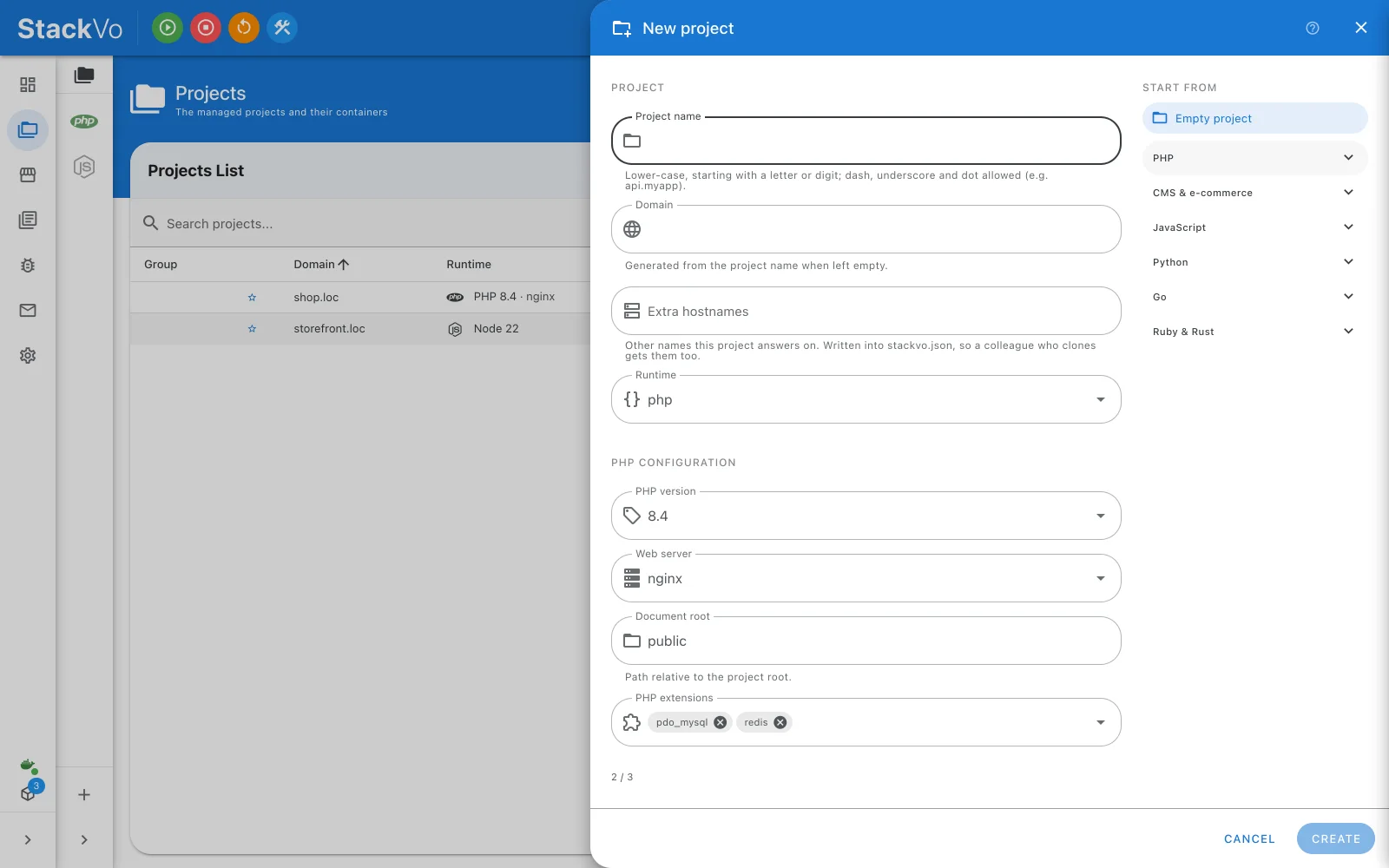
Projects → + opens the new-project panel. Three ways in:
| Starting point | What happens | When |
|---|---|---|
| Framework template | The framework's own installer runs in a throwaway container, then the result is adopted. Laravel, WordPress, Symfony, Next.js and more. | You are starting fresh. |
| Empty project | A project from the form's values. No installer runs. | You will bring the code, or have a skeleton. |
| Clone from git | Clones the repository and adopts what arrives. | The code already exists. |
Give it a name — shop — and the domain is derived: shop.loc. With a
template, runtime, web server and document root are read from what the
installer actually wrote, so those fields disappear. With an empty project you
pick them: PHP 8.4 on nginx, or Node 22, or another runtime from the
catalogue.
The first template takes a few minutes
The installer's image is downloaded once. After that, a new project of the same kind is quick.
4. Press Create
Behind the button:
stackvo.json  ──►  renderer  ──►  Dockerfile + compose fragment + Traefik router
                                    │
                                    ├─ the container comes up
                                    ├─ one line into your hosts file — the diff is shown first, then one password prompt
                                    └─ the certificate covers the new domain  →  https://shop.loc
The build streams Docker's own output, so you read the same lines you would in a terminal. Nothing is guessed.
5. Open it
Click the domain on the project row. The browser opens https://shop.loc
with no certificate warning.
What just happened
| Thing | Where it is | Why it matters |
|---|---|---|
stackvo.json |
projects/shop/ |
The one file that describes the project. Commit it and a teammate gets the same environment. |
| Dockerfile, compose fragment | generated/ |
Rendered from the manifest every time. Never edit them; change the manifest. |
| A container | Docker | The project's PHP or Node, its web server, its extensions. |
| A hosts line | Your hosts file | shop.loc → this machine. |
| The certificate | certs/ |
Reissued to cover the new domain. |
Check it works
- The project row says Running.
- The domain opens over HTTPS with no warning.
- Project → Overview shows the runtime version you chose.
Next: Everyday use — the seven pages and where things are.