A branch per environment
A git branch gets an environment of its own: its own folder, its own address, its own database. Both branches run at the same time, and nothing git would notice is written into your working copy. It is what cloud "preview environments" sell, locally and free.
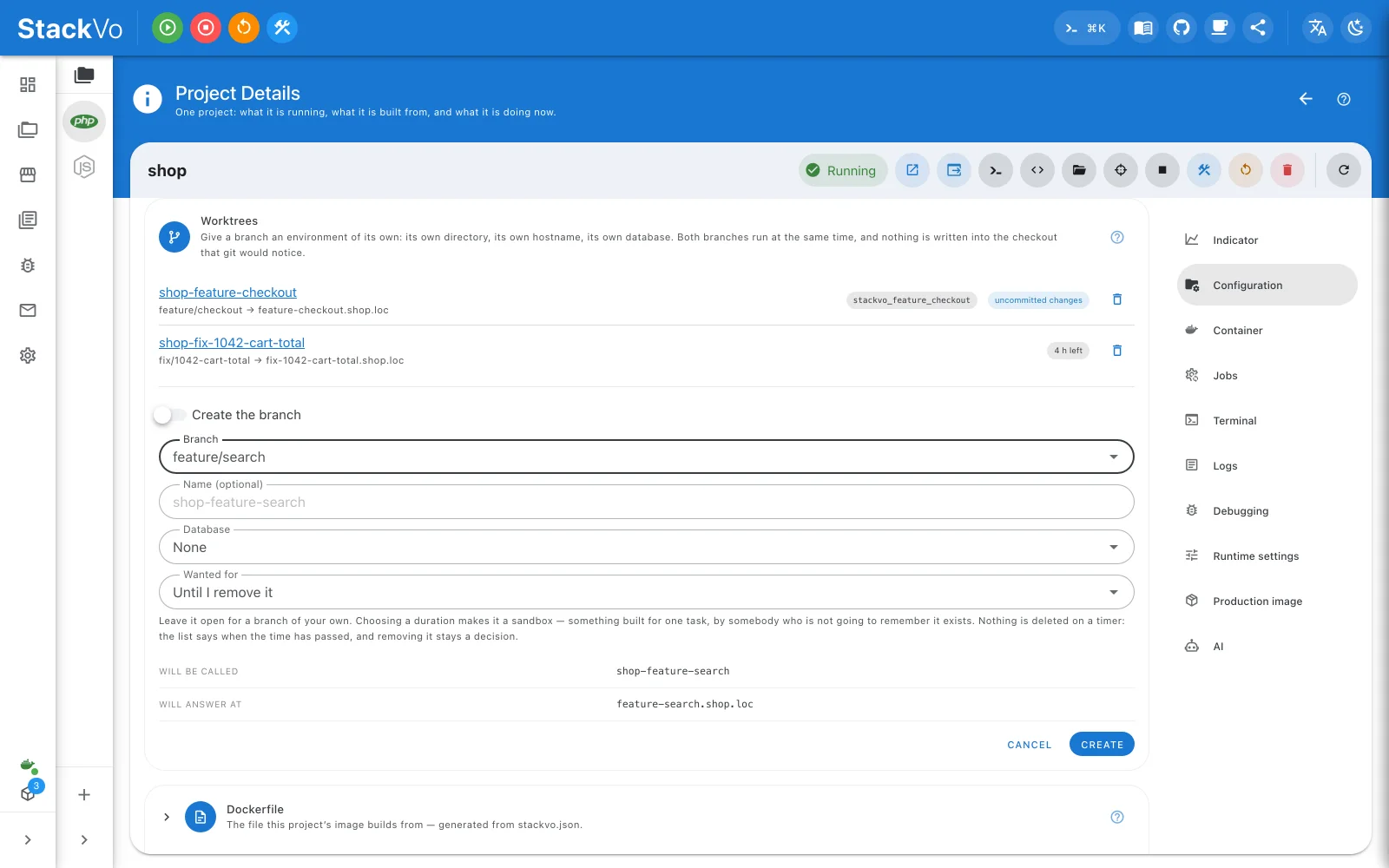
Create one
Project → Worktrees → New worktree.
| Field | What it does |
|---|---|
| Branch | Which branch gets the environment. Create branch opens a new one. |
| Name | The new project's name. Left empty, it is derived from the branch. |
| Database | None, new and empty, or a copy of this workspace's. |
| Wanted for | Empty for a branch of your own. A duration makes it a sandbox with an expiry. |
The name, the address — feature-checkout.shop.loc — and the database name
are shown before you press anything. They come back from the backend, so what
is on screen is what will be created.
The database really is separate
The login granted on the branch's database reaches only that database. The branch cannot read the one it was branched from.
Remove it
Remove deletes the worktree. Deleting the branch and deleting the database are separate switches, both off by default.
Sandboxes for an assistant
Choose a duration under Wanted for and the worktree becomes a sandbox: an environment built for one task, by somebody who is not going to remember it exists. It expires on its own. That is what makes handing a branch to an AI assistant a different act from handing it your machine.
Every worktree is also a project row: start, stop, logs, the lot.